Need advice? Let's talk.
Get straightforward guidance from your broadcasting partner. Schedule a call to chat with the team about your radio station.
Book DemoThe Ultimate Guide To Audio Broadcasting Software
Get up to speed on the different types of audio broadcasting software with this guide. Plus, we'll look at the best all-in-one solution for broadcasters who want a simple, streamlined set up.


Understanding the different types of audio broadcasting software (aka radio broadcasting software) can be confusing. Even when armed with definitions for each, how do they fit together and what do you actually need? This guide breaks down the different types of audio broadcasting software, how they can work together and the best solution for your broadcasting needs.
Key Takeaways
- There are various different types of software that people use to broadcast their internet radio stations.
- Radio servers are (typically remote) computers that stream your internet radio station to your listeners.
- Radio automation software keeps your different audio content being broadcast, without manual input from a person.
- Radio playout software is an app or programme that ensures your live, scheduled or automated audio content is actually pushed out to your station. As is the case of Radio.co's Playout, it can include live-assist tools too.
- Broadcasting software is an app or programme that connects your live audio to your radio server.
- Audio processing software is an app or programme that enhances the audio quality of your radio stream.
- Radio.co has all of these types of tools built into it's platform, so broadcasters don't have to cobble together different apps. Going live on your radio station, as well as producing, scheduling and automating radio shows can all happen from the Radio.co platform.
The Main Types of Audio Broadcasting Software
The most common types of audio broadcasting software (especially in relation to online radio stations) are:
Radio Servers
A radio server is essentially a computer that has the ability to stream audio to ‘clients’ (i.e. people connecting to the server). An internet radio station sends their digital audio to their radio server. When people connect to that server (through a listen link, app, or web-player), the server sends the audio stream to those people, so they’re listening in.
You can set up your own radio server and ‘self-host’ your own radio station. But this is a bit complicated if you don’t have the technical know-how. Which is where radio hosting platforms come in.
Radio Hosting Platforms
At its core, a radio hosting platform provides the infrastructure to connect to a radio server. Radio hosting platforms manage and maintain the radio servers you use. If they are to ever go down, the radio hosting platform is responsible for getting them back up and running.
Along with the technical aspects, radio hosting platforms also provide ways to manage an internet radio station.
For example, at Radio.co, our schedule feature lets you build your radio stations programme. Here you can set your station’s unique mix of pre-recorded shows, playlists and live shows. There are other features like voice tracking, track editing and playlist generators, which you can explore more here.
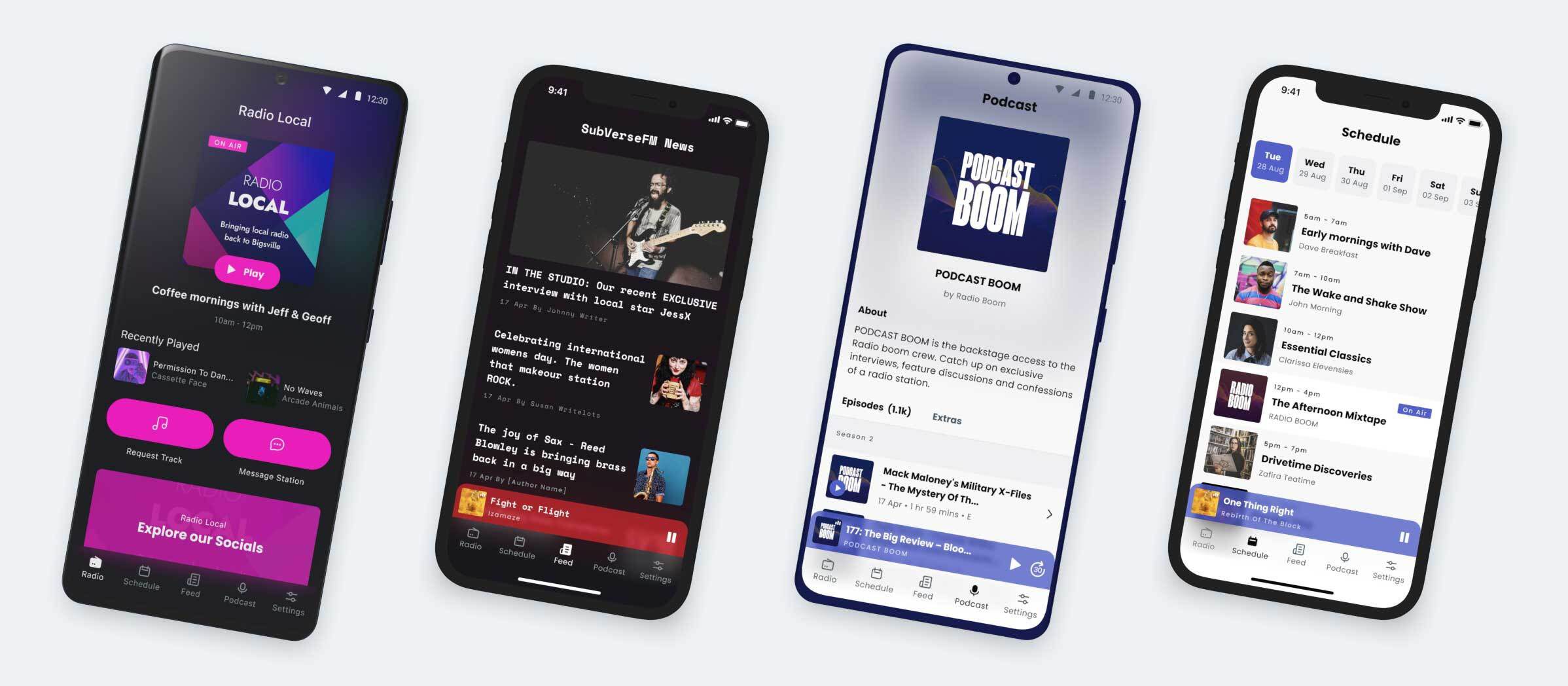
Finally, a radio hosting platform provides ways for your listeners to actually tune in to your station. Here at Radio.co, we provide mobile apps for your radio station, an Alexa Skill for smart speaker listening, players for your website, and links for web browsers or music players.
Radio Automation Software
Radio automation software does what the name says; it automates elements of your radio station so you don't have to manually programme every detail. This frees up presenters and producers from having to broadcast live 24/7. Automation software can usually do things like let users voice track their shows (i.e record audio links and insert them between songs & segments), set song transitions and create automatic rotations of music, songs and station IDs.
The Radio.co platform has automation software built into the platform, so users can automate as much or as little of their station as they like.
Radio Playout Software
Radio playout software is an app or programme that’s responsible for the delivery of audio on-air. It basically ensures that whatever is scheduled or happening live goes out to listeners. Playout software also gives radio presenters and producers computer-based controls when broadcasting live. This often includes a way of: editing song transitions (known as segues), firing jingles and sound FX, and deciding what music and other audio to play.

For Radio.co customers, the essential playout software capabilities are included within the platform. The Radio.co infrastructure honours your schedule including any automation rules you’ve set up, or pushes out live audio if you want to broadcast in real time. For live broadcasts, Radio.co gives you essential controls to create slick live shows. Including a segue editor, customisable cart wall and automatic music ducking for talk-overs.
Broadcasting Software
While all of the software mentioned is technically broadcasting software (as in its software related to broadcasting) the term ‘broadcasting software’ typically refers to an app or programme that encodes live digital audio to be sent to a radio server. If you’re with a radio hosting platform such as Live365, RadioKing and RadioCult, you need an extra piece of broadcasting software- like BUTT or Virtual DJ - to broadcast live.
This isn’t the case with Radio.co, as our platform has its own broadcasting software. So you don’t need to download and configure any extra program. All Radio.co customers can go live quickly by clicking the “Connect” button in Studio.
For Standard and above customers, our Playout feature works like a live production desk - but on your internet browser. Here you can broadcast live whilst firing off jingles, creating and reordering your playlist and editing segues as you go.
Audio Processing Software
Audio processing software is a programme or app that alters your audio to improve the sound quality. It is a digital alternative to the expensive legacy hardware AM/FM stations use to boost their sound. Audio processing can help a radio stream sound ‘cleaner’. It also can alter the perceived loudness of the stream and enhance the tonal qualities of a genre.
However, audio processing software be tricky to configure if you don’t have sound engineering experience.
Alternatively, Radio.co has it’s own audio processing software, EDGE™, which works on your radio stream. EDGE™ makes your radio stream sound fuller and increases the perceived loudness. It has 16 pre-configured presets to choose from, so you can select a tonal profile which complements your station’s genre(s). Radio.co clients can enable EDGE™ with one click in their Studio settings, the audio processing is then applied to both scheduled and live shows.
Check how EDGE™ transforms audio with our sample player.
How Do The Different Types of Audio Broadcasting Software Fit Together
As they do different things, each type of audio broadcasting software handles different parts of your audio chain, which starts with what you broadcast and ends with what listeners hear.
Think of your radio server as a river. It’s fed by two tributaries:
- Automated and scheduled audio: often stored within the cloud and handled by the radio hosting platform and/or the playout software.
- Live audio: fed into the radio server by your broadcasting software.
But unlike a river that can receive water at the same time from its tributaries, your radio server only receives and distributes one audio source at a time. You can’t hear a live show and a prerecorded show at the same time.
Audio processing software enhances the audio quality, and can exist anywhere on this chain. With EDGE™, the audio processing works on your radio stream before it’s sent to the radio server.
Radio.co: All-In-One Broadcasting Software Solution
For a simplified set-up, Radio.co is an all-in-one hosting platform that brings together all types of audio broadcasting software: automation, playout, audio processing, live broadcasting and radio servers.
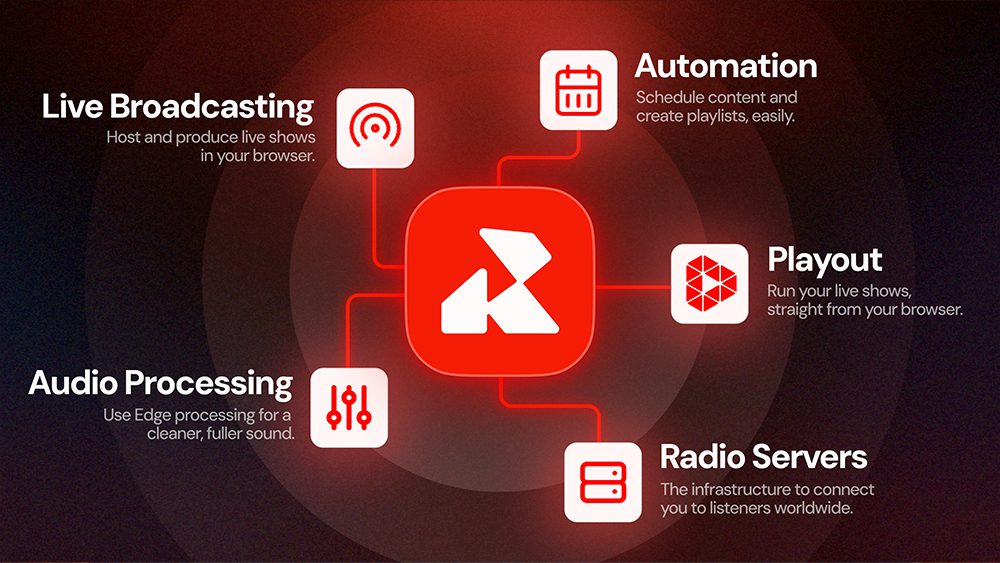
This means you only need the Radio.co platform to realise your station’s unique mix of automated, recorded and live shows. Every radio station manager knows their station changes over time. The Radio.co platform gives peace of mind that you can change your schedule, without needing to change your software. Whether you’ve got more live shows thanks to some newly recruited radio hosts, or want to up the automated content over the holiday season, Radio.co has everything you need.
Want To See How Radio.co Could Work For You?
If you’re thinking of starting your own radio station, or want to broadcast online, then we would to show you around Radio.co. You can book a one-on-one demo with one of our Radio experts, here. Alternatively, if you want to dive straight in, you can try Radio.co for 14-days with our free trial.


