
Platform -> Playout

Going live?
Run the show.

Prepare your running order, fire jingles, and talk live to your audience - directly to your Radio.co stream, all from your browser.

Included on Standard plans and above. Available as early access for Radio.co accounts.

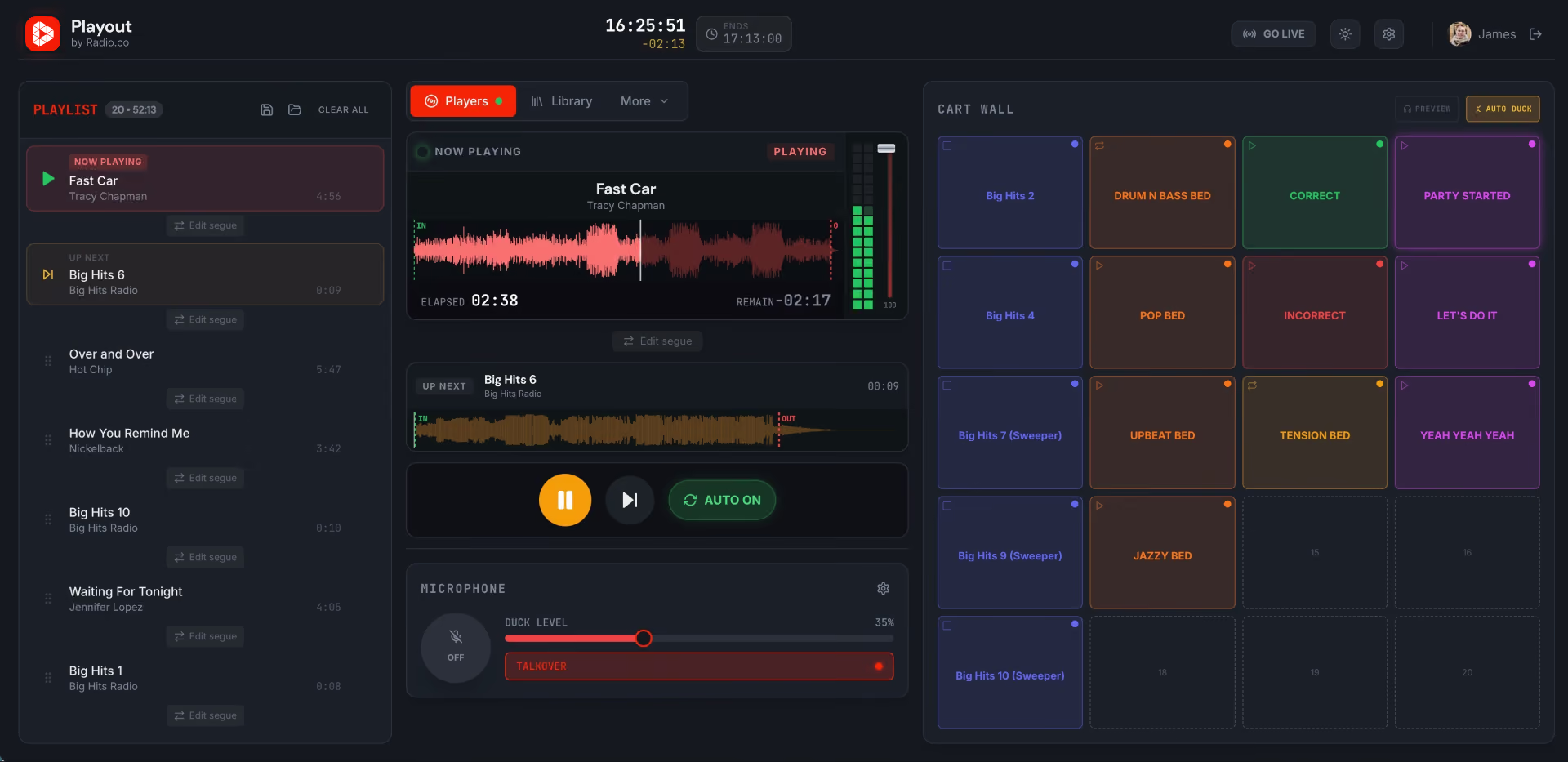
Radio.co Playout interface showing playlist, current track Fast Car, waveforms, and sound controls.
A green tick mark.
Uses your existing Radio.co station
A green tick mark.
Provides live production in your browser
A green tick mark.
No separate broadcast platform required

Automate it.
Present it.
Same station.

Radio.co Studio keeps your station running. When it’s time for a presenter-led show, Playout gives you the controls to step in and take over live.
There’s no extra app to configure and no separate library to rebuild. Simply sign in with Radio.co, choose your station and work with the media you already have.
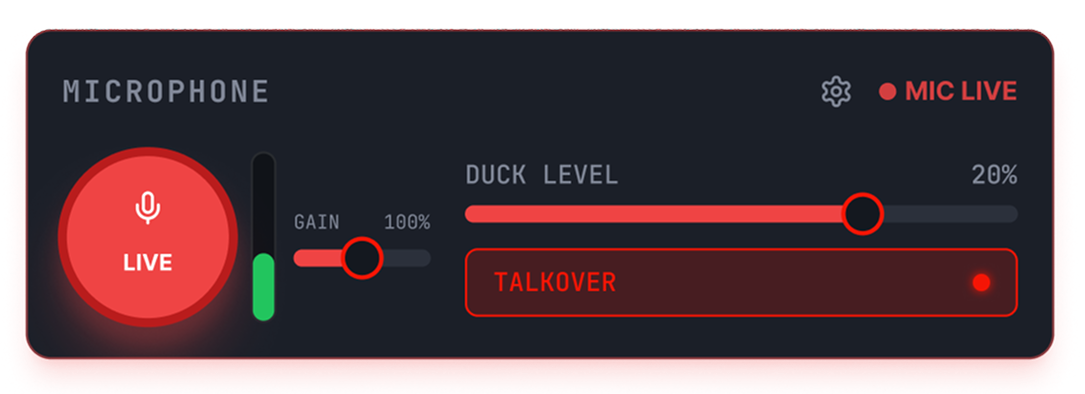
User interface panel for microphone control showing a large red circular button labeled LIVE with a microphone icon, a vertical volume level meter with a green segment, a gain slider set near 50%, a horizontal duck level slider at 20%, and a TALKOVER option activated. A settings gear icon and a red indicator labeled MIC LIVE appear on the top right.
A red Playout.co icon.
01 • prepare

Build the show before you go live.

Pull from your Radio.co library, build your running order, and get your show ready while you’re on air or before.
A red playlist icon.

Know what’s playing.
Decide what’s next.

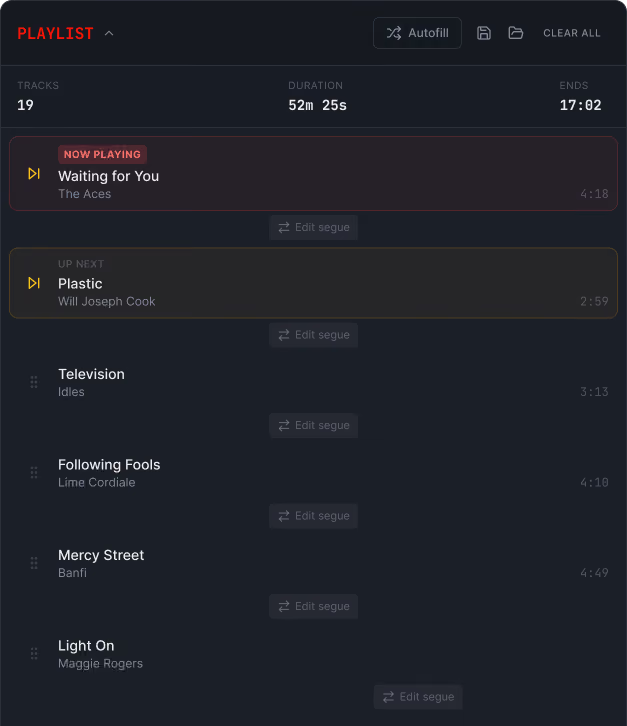
Queue music and production audio into a live playlist. Reorder the show as it develops, see what’s on now and keep the next item ready to go.
Orange tick icon.
Build or change the queue during a show
Orange tick icon.
See current, next, and upcoming items at a glance
Orange tick icon.
Choose whether tracks flow automatically or wait for you
Music playlist showing 19 tracks, now playing 'Waiting for You' by The Aces, next 'Plastic' by Will Joseph Cook.
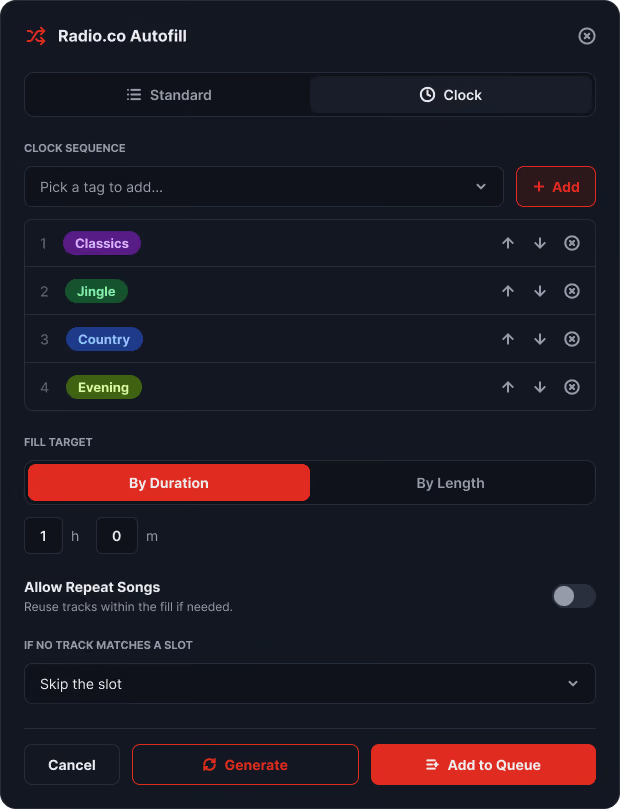
Radio.co Autofill interface showing clock sequence tags, fill target by duration, and options to generate or add to queue.
A red audiowave icon.

Autofill your time slot with your Radio.co library.

Choose the music you want, set a duration, and let Playout generate a queue from your station's library.
Orange tick icon.
Fill your slot by duration or track count
Orange tick icon.
Use Radio.co tags to shape the selection
Orange tick icon.
Build repeating content patterns with clock mode
02 • Perform

Everything in reach when you’re on air.

The essential live tools for a presenter, wrapped up in one production desk. The programme, microphone, and controls to keep the show sounding slick.
Radio.co Playout interface showing playlist, current track Fast Car, waveforms, and sound controls.
A red radio icon.

Run the programme

Play, pause, and skip your running order. Use auto for continuous playback, or take control to create space between tracks.
A red microphone icon.

Get on the mic

Choose your microphone or audio device and speak live, with automatic talk-over that lowers the music while you’re on air.
A red playlist icon.

Stay on top of what’s next

See what’s playing, what’s coming up, and the rest of your running order at a glance while the show continues.
A red audiowave icon.

Fire your carts.

Keep jingles, IDs, drops, beds, and effects ready to trigger instantly, with private previewing and optional music ducking.
CART WALL
00:00
Airhorn
00:00
By Radio.co
00:00
Cheering & Clapping
00:00
Wow!
A red join icon.

Get the next transition right before anyone hears it.

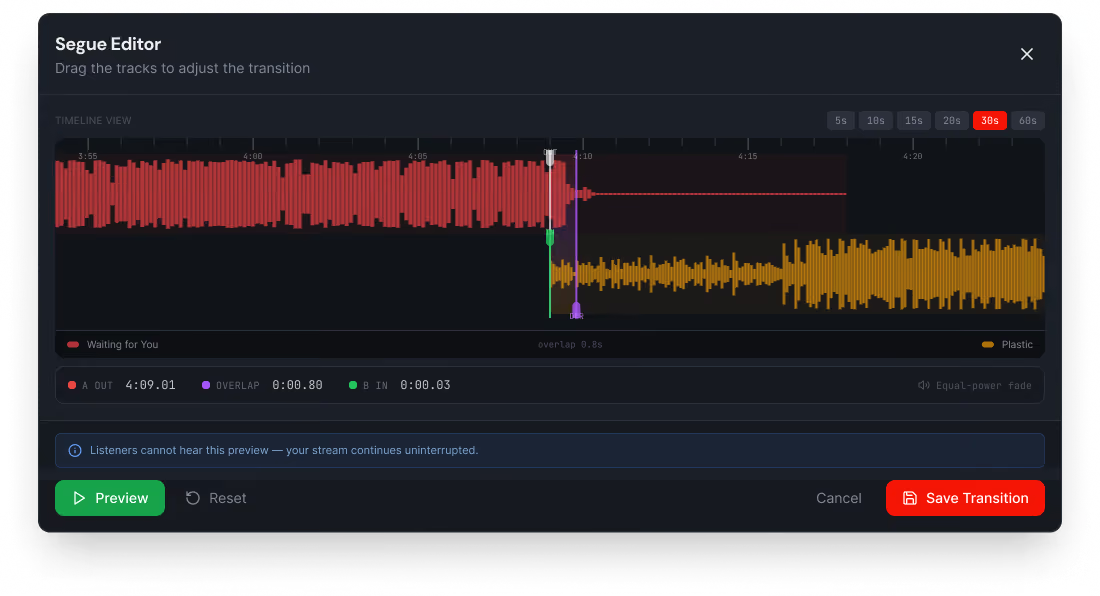
Preview privately, move the overlap, adjust fade timing, and save the transition while the current programme keeps broadcasting.
A segue editor for Playout.co.
03 • Broadcast

When you’re ready, take it live.

Connect Playout to your selected Radio.co station. Once you go live, the programme you create in Playout is what your listeners hear.
Go Live

Radio.co Studio

Your station's media library, schedule, and automated broadcast infrastructure.

A white arrow in a black arrow pointing to the right.

Playout

Connect your station and access music, jingles, mic, carts, and transitions.

A white arrow in a black arrow pointing to the right.

Listeners

The live programme goes out on your station, then broadcast to your listeners.

A red Playout.co icon.

Available in Early Access

Run the show.
Use Playout.

Playout is rolling out in early access to Radio.co broadcasters.
Try it with your station and help us shape what comes next.
Playout is included in the Standard plan and above.

Frequently Asked Questions

Here are quick answers to all your questions about Playout. Still need some help?
Get in touch

What is Playout?
A red plus symbol.

Playout, also known as Playout.co, is a browser-based live radio production desk for Radio.co. It lets you prepare a running order, play music, use your microphone, trigger carts, and broadcast live to your Radio.co station - all from one place.

Do I need a Radio.co account to use Playout?
A red plus symbol.

Yes. Playout works with your existing Radio.co account and station. So there’s no separate broadcast platform to configure. You can connect to your station and use media already stored in your Radio.co library.

Do I need to install any broadcasting software?
A red plus symbol.

No. Playout runs in your web browser. There’s no dedicated broadcasting application to download or maintain. You’ll need a compatible desktop browser and any audio equipment you want to use, such as a microphone or audio interface.

Can I use my existing Radio.co music and media?
A red plus symbol.

Yes. Playout connects to your Radio.co media library, so you can use your existing tracks, tags, and production audio when preparing a live show.

How does going live with Playout work?
A red plus symbol.

Choose your Radio.co station, prepare your show, and connect when you’re ready to broadcast. Once Playout is live, the programme you create, including music, microphone audio and carts, is sent to your station for your listeners to hear.

Can I use Playout alongside Radio.co's automated scheduling?
A red plus symbol.

Yes. Radio.co Studio can continue to handle your automated station schedule, while Playout is designed for the moments when you want to take over and present a show live. Both work with the same Radio.co station.

What does early access mean?
A red plus symbol.

Playout is currently being introduced as a Radio.co early access feature. That means the core experience is ready to use, but we're still improving it and may add, change, or refine features based on how broadcasters use it. If you run into something unexpected or have an idea that would make Playout better, we'd like to hear about it.

Who can access Playout during early access?
A red plus symbol.

Playout is rolling out to Radio.co broadcasters during early access, so availability may vary while we introduce it more widely. It's currently included in Standard plans and higher. Sign in to your Radio.co account to see if Playout is available for your station.

Trusted by broadcasters of all sizes since 2015.

Direct Chemist Outlet
Full Moon Radio
Nikki Beach
KFC
University of Manchester
Cafe del Mar
Lennar
Create Music Group
305 Fitness
Stars and Strikes
Eurotunnel LeShuttle
Superplayer & Co
Morley Radio
Gen X Radio
Black Sparrow Radio
Cybercrime Radio
Shady Pines Radio
Foundation FM
Fuse FM
Utter Radio
The Global Goals
Hotel Costes
Parker's Kitchen
Complex
AC Milan
Brit Asia TV
Camelot
The Standard
PHMG
Mambo Radio
iFIT
M+C Saatchi
Vice
KMAH Radio
Barbican
Yoto
Soho Radio
Roundhouse
Primavera Sound
Australia Gov
Next
Ibiza Live Radio
Honest Burgers
EXE Devon
Everton FC
Cult Records
Boogaloo Radio

Take it from here.
Start broadcasting today.

Thousands of stations trust us as their radio platform partner. You can too.
A white tick mark.
Join 5,000+ broadcasters
A white tick mark.
14 day free trial
A white tick mark.
No contracts, cancel anytime