Need advice? Let's talk.
Get straightforward guidance from your broadcasting partner. Schedule a call to chat with the team about your radio station.
Book DemoThe Mobile Radio Revolution: Why Your Radio Station Needs an App
Keep listeners connected on the go. Learn how a custom mobile app brings your radio station straight to smartphones and car dashboards, removing technical friction and boosting listener engagement.


What Are Branded Radio Apps?
Branded radio apps are mobile applications custom-built for individual radio stations or broadcast networks. They make it incredibly easy for listeners worldwide to tune into your show using their smartphones or tablets. Whether they’re sitting on a beach in the Caribbean or tackling the morning school run.

Why Your Radio Station Should Have Its Own Mobile App
We live in a digital-first world. We expect products and services to always be efficient and easy-to use. Removing any technical friction helps to streamline the listening experience, helping it to stay relevant. It keeps you competitive in the market and attracts a global audience. All while ensuring your original listeners stay deeply engaged.
Before we dive into the full list of advantages, here’s a quick breakdown on why mobile radio apps are a great idea for your station:
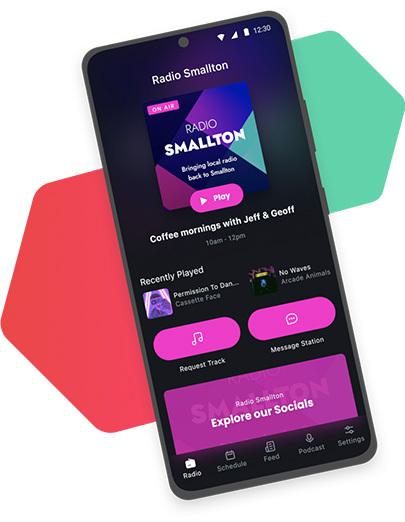
- Accessibility: A dedicated app gives your audience complete freedom to tune into your broadcasts from wherever they are in the world. The hassle of finding a specific radio frequency or hovering awkwardly in a spot with good signal completely disappears.
- Engagement: There are few better ways to connect with your community than to gather instant, actionable feedback after each broadcast. Want to trial a newly put-together playlist? An app lets your listeners tell you exactly how they feel about it in real-time.
What Are the Benefits of Smartphone-Based Broadcasting?
For Listeners:
- Mobility: The biggest advantage is in the name. Digital platforms allow your audience to tune into your show from anywhere, at any time, effortlessly expanding your reach.
- On-Demand Access: A dedicated app lets people listen on their own terms. By offering catch-up opportunities like past shows and podcasts, you ensure your community never misses anything. No matter their schedule.
- Instant Updates & Notifications: Listeners can opt-in to receive tailored push notifications. The moment a new show drops, a live broadcast begins, or an exclusive station event is announced, the update goes straight to the listener’s phone.
- Interaction: What makes radio special is the unique bond between hosts and listeners. Radio offers a sense of companionship and a welcome escape from everyday anxieties. Mobile apps supercharge this connection by offering interactive features like social media integration, song requests, and direct messaging right at the user’s fingertips.
Key Takeaway for Listeners:
Mobile radio transforms passive listening into a portable, interactive community experience.

For Radio Station Owners:
- Audience Ownership: Your app means your audience is entirely your own. You are not subject to shifting algorithms, third-party platform control, or competitor ads. Your brand is always front and centre.
- Dashboard Integration: In-car listening is where radio thrives, and now it’s smoother than ever. Radio.co apps have Apple CarPlay and Android Auto. Meaning your customised experience transfers seamlessly from the user’s phone to their car’s dashboard display. Letting listeners take your station on their drives too.
- Dedicated Brand Hub: Having a central home base for your community to congregate is invaluable. A custom app becomes a personalised space tailored entirely to your station’s values, niche, and unique listener culture.
- Zero Distractions: Because the app is yours, you don’t have to worry about competitor stations or external advertisements. You control exactly what listeners see and hear.
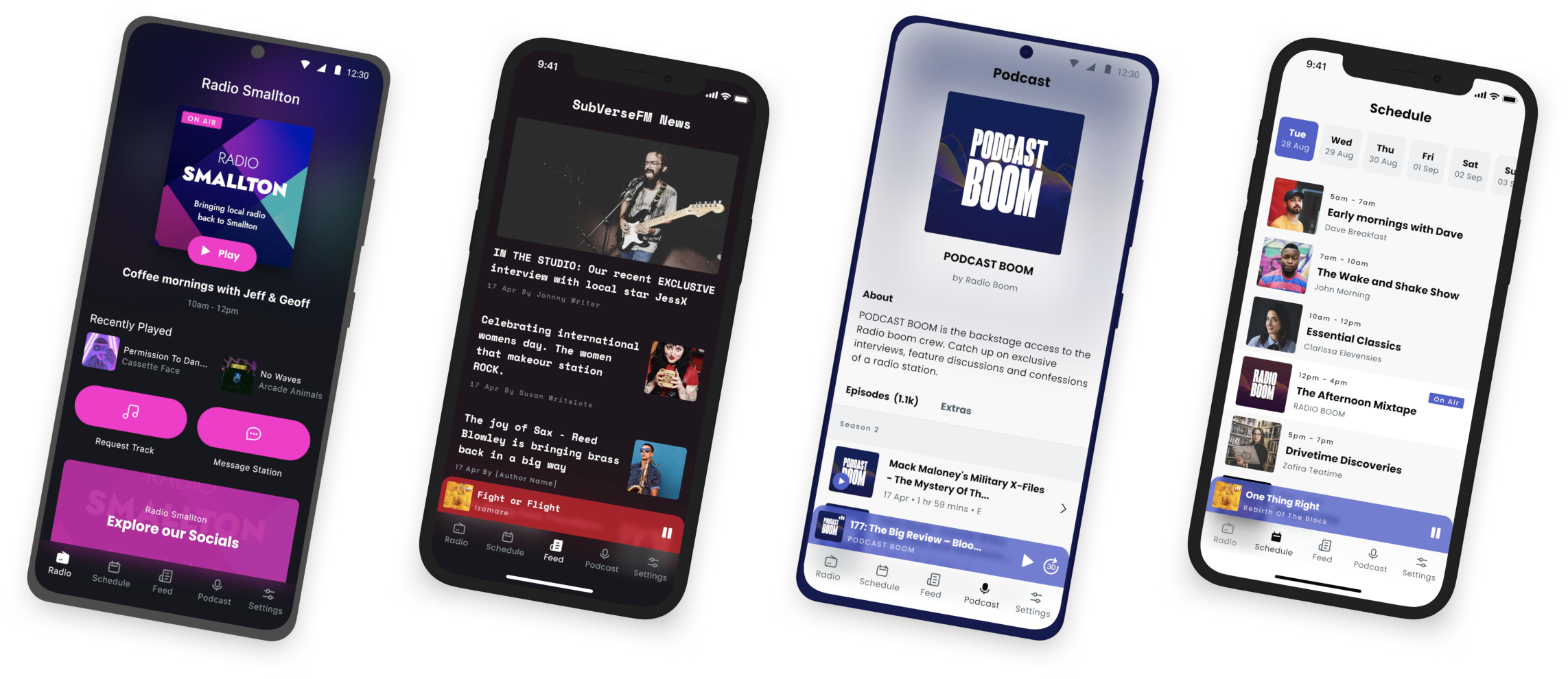
- Improved Engagement: Treat your audience to a sleek, well-rounded experience with real-time “now playing” and “up next” updates, album art, presenter biographies, track histories, and direct lines into the studio.
Key Takeaway for Owners:
A branded app beats a generic radio app player like TuneIn by turning your audio feed into a powerful multi-platform digital destination.

What Makes a Great Radio App?
A successful mobile radio app does more than just let listeners tune in easily. It serves as a bridge that connects your broadcasts with your audience’s daily lives. To deliver value, a great radio app focuses on these core features:
Core Features
A radio app can only be as good as its player. The essential features of a radio app focus entirely on delivering that smooth, sleek, professional audio.
- Audio Player: Your radio broadcast should play seamlessly in the background as your audience listens on the go. Whether their phones are locked or they’re doing other things, audio should stay stable and not drop out.
- Smart Stream Adaptation: The player should be able to adjust its bitrate based on the user’s device’s connection. This ensures a crisp, sleek sound when they are connected to strong home WiFi, while also protecting their mobile data when they tune in when out and about.
Convenience & Flow
Radio apps can significantly improve the user experience (UX) by removing technical effort and friction. An app can make listening feel like a natural and effortless experience.
- Easily Navigable Interface: The design should be accessible and easy to navigate. Play/Pause buttons, Rewind/Fast-forward should all be positioned clearly for comfortable, easy operation.
- Instant Visual Context: Useful metadata like “Now Playing” and “Up Next” updates, track titles, and album cover art should be visible on the user interface so listeners are never unsure or have to guess what or who they are listening to.
Community & Connection
Done well, a mobile radio app can transform your passive listeners into loyal, active community members that keep coming back for more.
- Direct Studio Hotlines: Interactive features like easy one-tap song requests, social media integration, and messaging straight to the host or station owner, make listeners feel like they are valued and part of the show.
- Push Notifications: Instead of irritating and spamming users, a great radio app smartly alerts users at the right time - when their favourite show goes live, or an interesting guest joins the broadcast.
How To Get Started With Radio.co?
Creating your own radio app with Radio.co is a simple process. By using our dedicated app builder, our team of skilled technicians handle all the complicated development work, so you don’t have to touch a single line of code.
Step 1: Set Up Your Developer Accounts
First, you will need to apply for your Google Developer and Apple Developer accounts. To make this easy, we have compiled comprehensive, step-by-step guides on how to do this - take a look.
Step 2: Access the App Builder
Use your existing Radio.co details to log into our App Builder.
Step 3: Connect Your Station
Select Radio Stations from the menu on the left and choose your station. Fill in some basic information about your station and click Update Station Information to save your progress.
Step 4: Customise Your App
Decide on your app’s visual identity. Think about your app theme, accent colours, and type style to make sure it matches your station’s branding. Once you’ve curated your perfect layout, make sure to save your work.
Step 5: Enable Interactive Features
Next, you can turn on optional content features to enrich the listening experience. This is where you can add an RSS web feed, a podcast feed, social media links, and direct contact methods.
Step 6: Create a Privacy Policy
A privacy policy is an essential requirement for both major app stores. It clearly informs your listeners about what information the app collects, why this data is gathered, and how it will be stored and handled.
Step 7: Complete Your Store Listing Details
Fill in the remaining details that will be shown publicly to users browsing the Google Play Store or Apple App Store. This is also where you can upload your custom App Icon.
Step 8: Share Developer Access with Radio.co
Finally, grant Radio.co access to your developer accounts so our team can handle the technical workload.
- For Apple: We will need your Apple Developer Team ID, Apple Developer account email, and account password.
- For Google Play: We will need your Google Play account name and JSON key. Make sure to add studio@radio.co as an authorised user on your Google Play Developer Account.
For more in-depth guidance on building your app, check out our article on How to Make an App For Your Radio Station here.
Sit Back & Relax - While We Take Over
Once we have finished building your custom app, we will submit it directly to Google and Apple for review. It can take up to 10 working days for new apps to be approved. Once confirmed, your app will be live and ready for your listeners to download.
No coding, technical knowledge, or prior experience required. With Radio.co, you can easily launch a sleek, professional iOS or Android app tailored uniquely to your internet radio station.
Conclusion
Bringing your radio station directly to your listeners’ pockets is the best way to keep them engaged. Thanks to modern platform tools and our dedicated team of radio professionals, creating a custom radio app is easier than ever. Don’t keep waiting to expand your reach and stay connected - sign up to Radio.co and start designing your station’s new app today.


