Need advice? Let's talk.
Get straightforward guidance from your broadcasting partner. Schedule a call to chat with the team about your radio station.
Book DemoHow To Video Stream Your Radio Station From Your iPhone
Turn your iPhone into a professional radio studio with iziCast. Broadcast live audio and video simultaneously - from anywhere in the world.


Introduction
Oh, the wonders of the internet.
What if we told you that you don’t need loads of expensive equipment, a clunky PC, or even a laptop to start streaming your radio station to your listeners?
Internet radio revolutionised the audio industry, and the technology just keeps on giving. Stream your station on-location or on-the-go, with everything you need already sitting in your pocket.
Easy-to-use, iPhone-friendly tools like iziCast are readily available to help your audio reach your listeners wherever you are. But, 2026 is the year of the video. Why not keep your radio station competitive and help it stand out by integrating video into your broadcast?
What You’ll Learn:
This guide will walk you through:
- How to set iziCast up for the first time
- How to start broadcasting audio directly to your Radio.co radio station
- How to simultaneously stream video to boost your station’s reach
What is iziCast?
Founded by Daniel Noethen - the creator of streaming tool BUTT - iziCast is a client broadcaster that allows radio station hosts to stream their shows straight from an iPhone or iPad (sorry Android users!). The app works seamlessly for Radio.co, Icecast, Shoutcast, and RTMP broadcasters.
iziCast enables users to broadcast and record live audio from an internal microphone, external audio devices, and Audiobus-compatible apps. It essentially turns your phone into a portable radio studio.
Why Use iziCast in 2026?
- Portability: With iziCast, you can take your broadcast anywhere. Your iPhone or iPad becomes a fully-functional mobile radio studio without sacrificing audio or video quality. Simply download the app store and start streaming - from anywhere.
- Reliability: iziCast is widely praised for its robust, stable performance. Built to handle hours of uninterrupted streaming without crashes. It fully supports external microphones, mixers, and a wide range of streaming standards to ensure your sound stays crisp.
- Dual-Streaming: iziCast allows you to stream audio and video simultaneously. Send your show directly to your radio station while keeping your audience visually engaged on platforms like YouTube or Facebook - all from one device.
How to Broadcast Live From Your iPhone or iPad With iziCast
You can download iziCast from the App Store. To connect your Radio.co radio station, you will need your broadcasting credentials (server address, password, and port). These can all be found in your Radio.co Dashboard, under the Live tab.
- Open iziCast and enter your credentials.
- Click SAVE.
- Press the PLAY button to start streaming live.
The on-screen duration timer will show you exactly how long you have been on air. By default, iziCast uses your device’s built-in microphone. To end a broadcasting session, simply press STOP.
Pro Tip: Experiment with the recording settings to enable “Auto Stop”. This tells iziCast to end a broadcast automatically when there is no sound detected, saving you from broadcasting “dead air”.
Your recorded shows are saved as high-quality .mp3s within the app. From there, you can easily share them across apps like Mail, Messages, WhatsApp, or Airdrop.

Setting Up iziCast For Video Streaming
In 2026, video is becoming more essential to keep audiences engaged and transform audio content into an even more immersive experience. iziCast allows you to broadcast audio and video directly to platforms like YouTube, Twitch, Facebook, Telegram, and other RTMP compatible services.
You have free reign over your visuals. You can opt for:
- Album Cover Art: Automatically display the cover of the track you’re playing.
- Static Images: Opt for a plain background, station logo, or default black image to preserve bandwidth.
- Live Video: Use your iPhone or iPad camera to give listeners a "behind the scenes” insight to your stream.
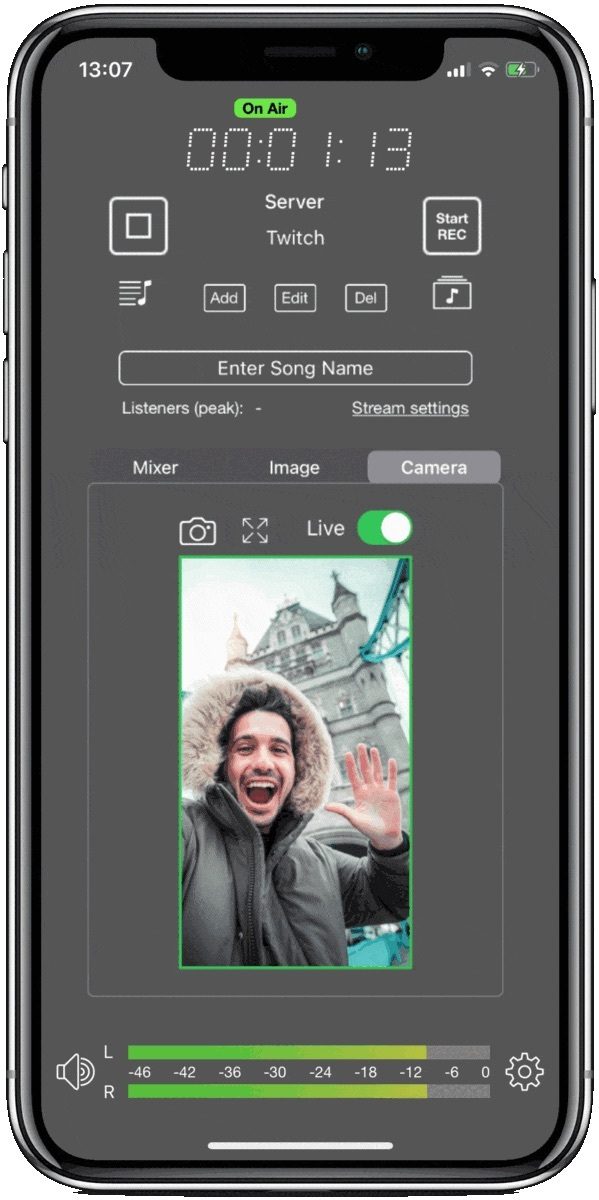
How to Add an RTMP Server to Begin Streaming With iziCast
- On your iziCast Dashboard, tap ADD.
- Enter your server details (can be found in your Radio.co Dashboard or social media streaming settings).
- Choose your source: select an image from your library or your device camera. You can change the image at any time.
- Once selected, tap ADD.
- Select PLAY to start streaming your video feed.
Note: iziCast can pull song information and album covers automatically. Go into Settings and toggle the “Update song from file” button and “Use album cover” button.
Using Your Device as a Video Source
If you want to use your device camera, select your preferred lens (front or back) and increase the camera preview size. Simply rotate your device to switch between Portrait (ideal for Instagram or TikTok) and Landscape (better for YouTube or Facebook).
You can even add a text bar above the video to display song information, your show’s name, or a “Coming Up Next” teaser. This keeps your audience informed and visually engaged.
The Studio Checklist: Mobile Edition
Before starting your video stream, run through this checklist:
- No Distractions: Make sure your phone is turned to Do Not Disturb so random calls, texts, or app notifications don't disrupt your stream.
- Full Battery: Ensure your device is fully charged or is plugged-in to save it from dying midway through a broadcast.
- Strong Connection: Use 4G or 5G, or a stable, reliable Wi-Fi connection for video quality.
- Appropriate Levels: Check the gain meters in iziCast to make sure your audio isn’t “peaking” during recording.
iziCast Vs. Other Mobile Streaming Apps
Competing apps like Larix Broadcaster, Wirecast Go, and Prism Live Studio sit at a similar price range, but their strengths lie mainly in visual production. If you are a podcaster, a DJ, or a radio broadcaster, audio quality is still paramount to the listening experience.
iziCast continues to lead in dual-streaming performance without sacrificing audio quality. It combines accessible, high-quality video streaming with features built specifically for professional audio workflows. The app offers full USB mixer and audio interface support, built-in equalisers and limiters, and the ability to stream directly to external RTMP platforms. This makes it an appealing choice for audio-first creators who still want to integrate video into their content.
App | Price | Primary Strength | Best For |
iziCast | $11.99 one-time purchase | Studio-grade audio + RTMP video | Podcasters, radio broadcasters, DJs |
Larix Broadcaster | Free / $9.99/month | Enterprise video protocols (SRT/NDI) | Professional video engineers & livestreamers |
PRISM Live | Free | Visual effects & multistreaming | Social media content creators |
Wirecast Go | Free / $5.99 one-time purchase | Secondary iOS camera feed | Existing desktop Wirecast users |
Conclusion
We’re all about making radio as accessible as possible. Gone are the days of professional studios and expensive equipment gatekeeping the industry. Whether you’re broadcasting in your bedroom, a local coffee shop, or on a beach across the world, you can now enjoy the power and flexibility of a full broadcasting studio right in the palm of your hand.
In 2026, this is easy, accessible, limitless radio.
Join Radio.co today or sign up to our 14-day free trial to start your radio journey and start broadcasting from anywhere.
Good luck!


