Need advice? Let's talk.
Get straightforward guidance from your broadcasting partner. Schedule a call to chat with the team about your radio station.
Book DemoWhich Radio Hosting Platforms Have In-Built AI Tools?
Want to streamline your radio production? Discover which radio hosting platforms have in-built AI tools in our handy guide.

Scheduling tools, playlist automation and live broadcasting are common features of radio hosting platforms. What’s really driving change and switching up workflows is that buzzword: AI.
AI tools are being used by broadcasters to help with radio production, from voice generation to script writing. But often these are third party applications to use alongside your playout software and scheduling system. And third party AI tools can create more headaches for broadcasters. They often limit usage on their free plans to push users to their paid subscriptions. Adding another expense to money-stretched stations.
For radio stations to keep costs down and production streamlined, integrated AI tools (within your current software) are a good solution.

So which radio hosting platforms have in-built AI tools? We’ll take a look at the limited couple that do, their uses in radio and who they’re best suited for.
A quick caveat: We know using AI for creative endeavours in particular is a divisive topic. And we fully support broadcasters who don’t want to use it. Nor do we judge those that do. These tools are optional. Let’s get stuck into it.
What We've Included In This Guide
This guide focuses on in-built AI tools within radio hosting platforms. This means the AI tool can be used and deployed without the user having to switch programmes. We've reviewed radio hosting platforms that meet this criteria.
A Quick Comparison
Platform | Does it Have AI Tools? | Who Is the Platform + Tool Best For? | What Does It Cost? |
|---|---|---|---|
Radio.co | Yes: | Broadcasters wanting a multi-use tool to create voice-overs, segments, radio ads, news bulletins etc.
| Included in Radio.co plans (excluding Lite) from $59 a month including 1,500 AI Voice Generation Credits per month. Higher costing subscriptions get more voice generation credits each month. |
Broadcast Radio/ Myriad 6 Playout | Yes, Script and Speech generation in ‘AI Voice Link’ | Broadcasters wanting formulaic and consistent voice links and voice tracking over creativity. | Included in Myriad Ultimate plan $187.53 per month or Pro plan $254.98 per month. |
Aiir | None. | n/a | n/a |
Airtime Pro | None. | n/a | n/a |
AsuraHosting | None. | n/a | n/a |
Live365 | None. | n/a | n/a |
RadioCult | None. | n/a | n/a |
RadioJar | None. | n/a | n/a |
RadioKing | None. | n/a | n/a |
Spacial Audio (SAM Broadcaster) | None. | n/a | n/a |
Zeno Media | None. | n/a | n/a |
The 2 Radio Hosting Platforms With In-Built AI Tools
Radio.co
Overview
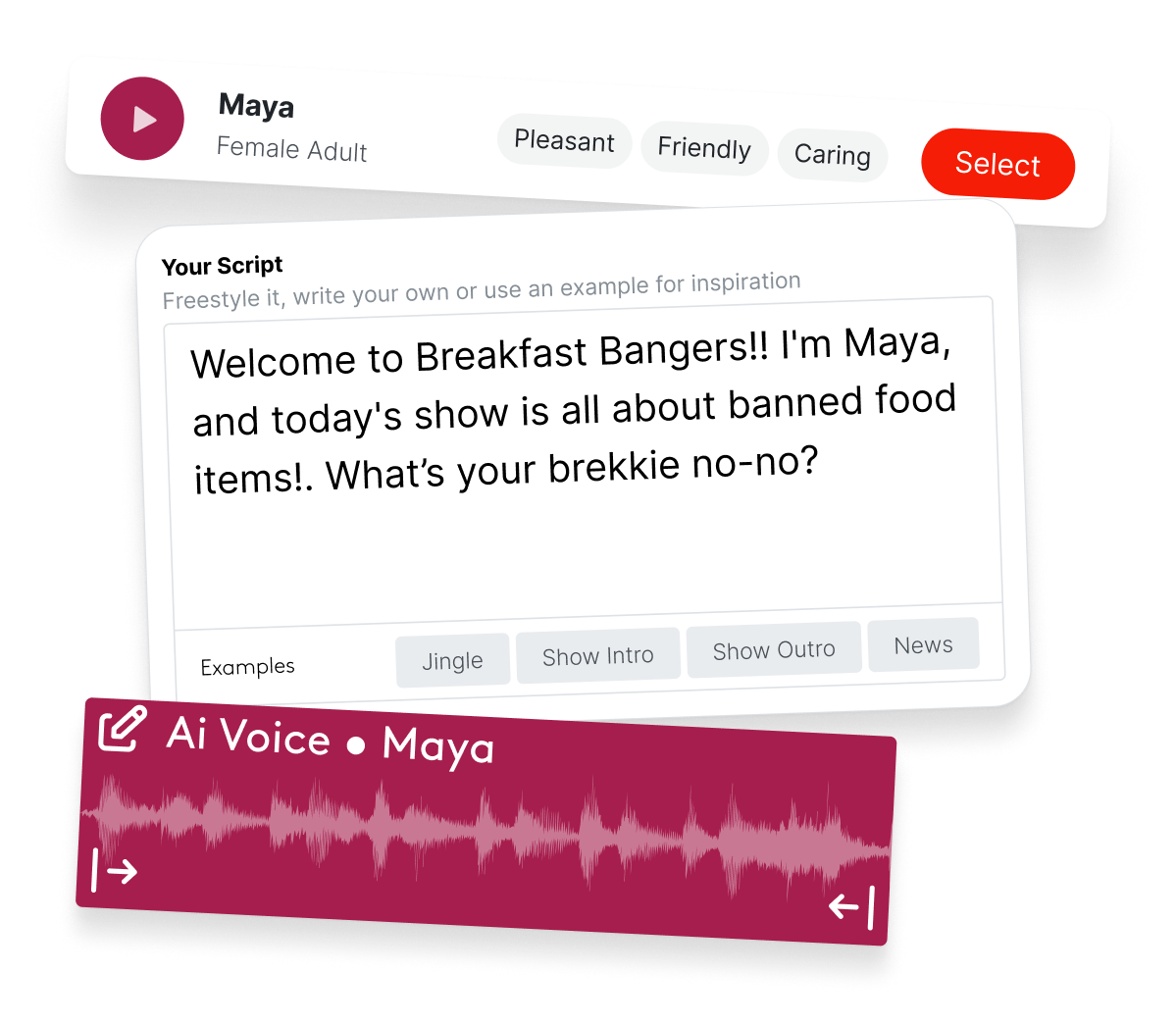
Radio.co offers in-built AI voice generation within the Voice Studio feature, included for all users on Standard or above plans. Voice Studio is essentially a native Digital Audio Workstation (DAW) within the Radio.co dashboard that lets users seamlessly produce their radio shows. Users have dozens of AI Voices to choose from in a range of accents: English (US, UK, Canadian, Australian) Spanish and German.
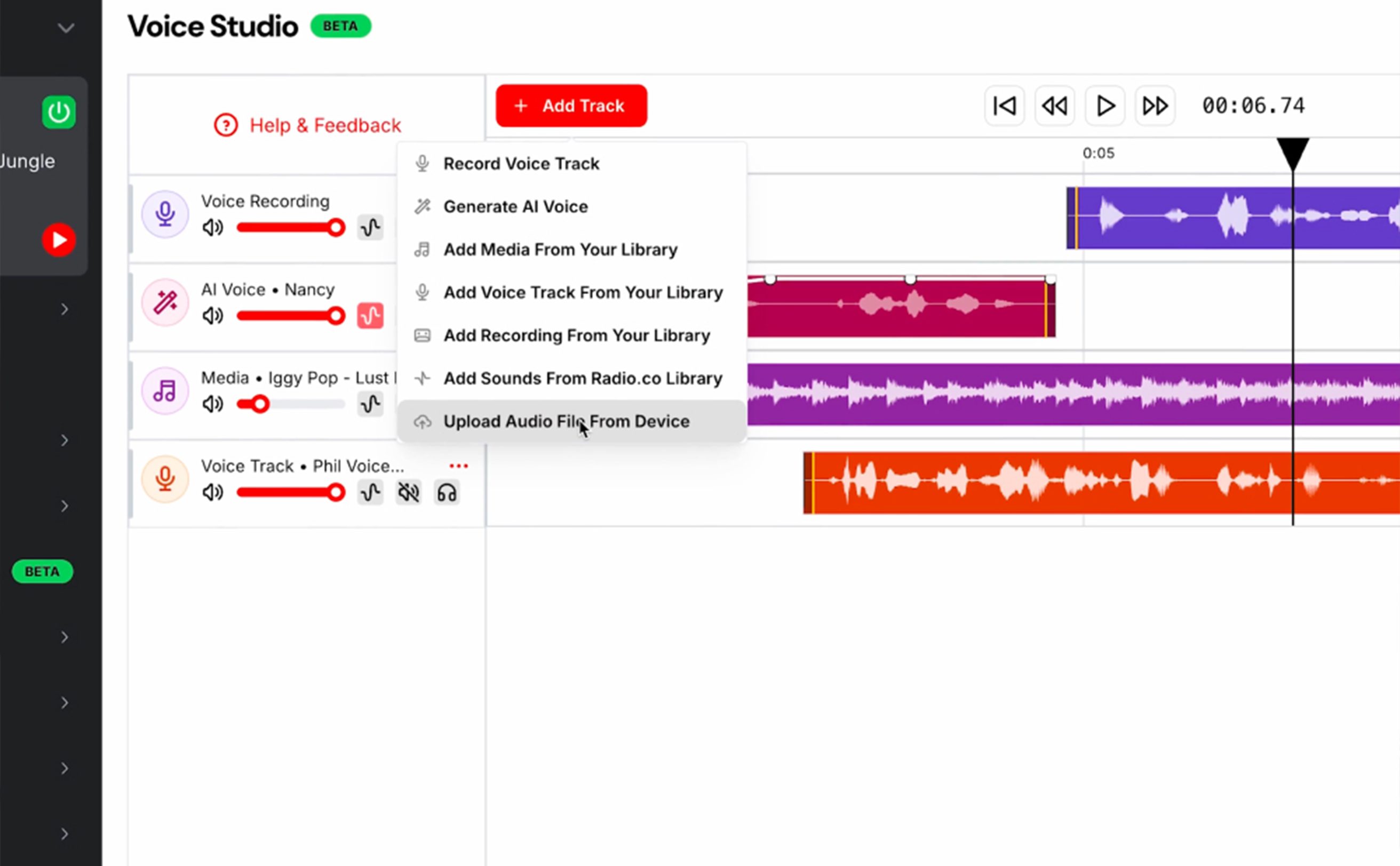
They can also add in tracks, their own sound effects, or those from the Radio.co Sound Library. Ensuring they can use the Voice Studio suite and the AI voice generation for a number of uses: creating radio imaging, radio ads, radio segments or producing radio shows as a whole.
What Radio.co's Voice Studio Can Do
- Generate AI voices from the users own scripts or from templates.
- Generate AI Voices in a range of languages and accents: English (US, UK, Australian and Canadian accents), Spanish & German.
- Record the user's own voice.
- Add recordings e.g guest interviews.
- Let the user add in media, including music, their own sound effects or sounds from the Radio.co Sound Library.
- Create the voice-overs for radio ads and news bulletins when the user supplies a script.
- Let users mix all these elements together to create radio ads, news bulletins, show segments, voice-overs or whole radio shows.
What Radio.co's Voice Studio Can’t Do
- Identify the audio previously played or coming up. These details, for example “Last Track Played” have to be added by the user.
- Be automated to run on live broadcasts.
The Pros of Radio.co's Voice Studio
- Included in the Radio.co pricing (Standard plans and above)
- Generate audio to be added seamlessly to the Radio.co schedule, no need to export and re-upload.
- Complete editing suite with all the tools needed to produce radio.
- A range of accents available.
- Voice link templates available.
- Intuitive interface for radio professionals.
- Available on Mac, Windows & Linux operating systems
The Cons of Radio.co's Voice Studio
- Inability to clone your own voice.
- Inability to identify and announce preceding or proceeding audio; has to be inputted by the user.
- Can't be automated to run on live broadcasts.
Who is Radio.co's Voice Studio Best For?
- Individual radio hosts who want an AI co-host (& in American, Australian, Canadian, English, German or Spanish accents).
- Broadcasters who want a multi-use tool for content production and are happy to supply their own scripts for voice-overs (either written by humans or LLMs).
- Broadcasters and radio hosts who want to use AI voices within their radio hosting platform, and not add an extra app into their workflows.
- Broadcasters that want to generate AI voices in the same programme they produce radio.
2. Myriad 6 Playout
Overview
Myriad’s AI Voice Link feature is their in-built AI Tool within their Playout6 Software. Available on Windows machines, the tool is used to generate AI speech to link radio show components.
Myriad describes its AI Voice Link as ‘Log Aware’. Essentially the tool has the ability to ‘read’ the tags of the schedule’s content. The tags include song names, current time, station name, previously played song and upcoming song. This means the feature can ‘announce’ things like what was previously played and what’s upcoming, when the correct tagging is in place. The frequency of how often an AI Voice Link references a ‘tag’ can be set, ranging from never to always.
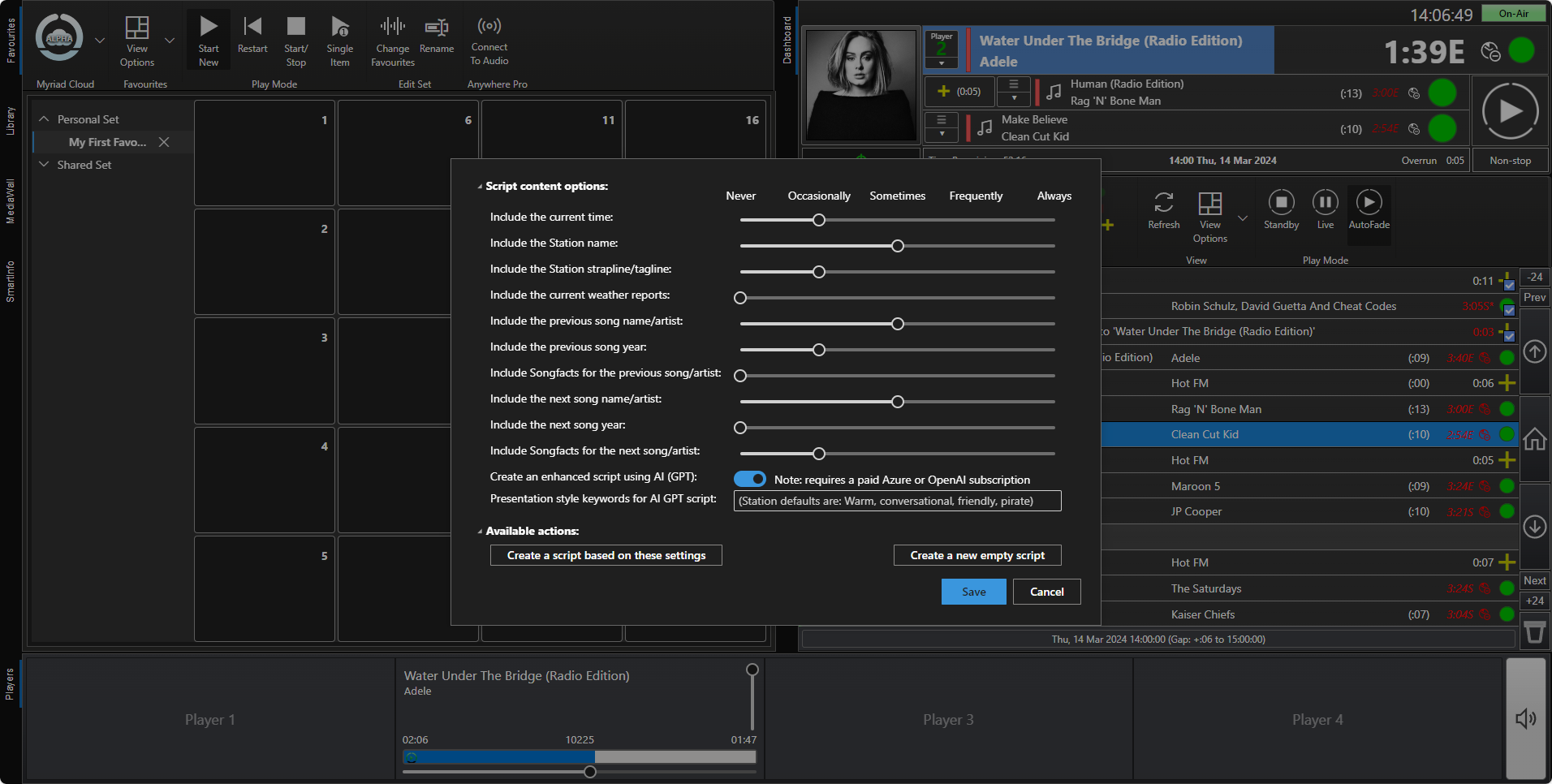
AI Voice Link doesn’t have any native AI voices, instead it integrates with 4 other AI voice tools: Elevenlabs, Windows Voice, Google TTS or Azure.
What Myriad's AI Voice Link Can Do
- Script and generate AI voice links between your show's components like music, imaging, talking segments, news bulletins and weather reports.
- Generate voice-overs that use either a cloned voice or an AI voice.
- Create weather bulletins from a supplied weather source.
- Automate all voice links you have in your schedule.
- Include "live" information (e.g. previously played song, current time, upcoming show) when correctly tagged.
What Myriad's AI Voice Link Can't Do
- Be used on macOS or Linux machines.
- Generate AI Voices natively, it relies on Windows Voice, Elevenlabs, Azure or Google TTS.

The Pros of Myriad's AI Voice Link
- Included within most Myriad Playout6 subscriptions.
- Its integration with AI Voice Generation Tools (see above) gives users a wide choice of accents and dialects.
- Automates every voice link, giving listeners a 'host' when the station is unmanned.
- Any team member can generate voice links as it doesn't require creative oversight.
- Announces 'live' information, like current time or what's just been played.
- Can set the 'goal' of each link.
The Cons of Myriad's AI Voice Link
- Only available on Myriad Playout6, a programme for Windows.
- The free voice generation options can sound robotic, the better 3rd party Text To Speech generators can be expensive.
- For maximum benefit, it requires subscriptions to a Large Language Model for scripts and a Text To Speech generator for voices.
- General link settings have to be applied to all links, reducing creative control of producers.
- Admin-focused interface makes it fiddly to set up.
Who is Myriad's AI Voice Link Best For?
- Radio stations that want a formulaic and consistent approach to voice links and voice tracking shows.
- Radio stations with existing LLM and/or voice generator subscriptions.
- Radio stations wanting a 'in-one' script generation and text to speech tool.
- Radio stations wanting to automate voice links to sound live.
What About Other Radio Hosting Platforms?
We checked Aiir, Live365, RadioJar, RadioCult, RadioKing, Airtime Pro, Asura Hosting, Zeno, Mixlr and these platforms do not have in-built AI tools at the time of writing. To use AI tools with these platforms, users will have to use a 3rd party app. Some platforms own AI products, e.g. Aiir owns Audio.co. But this tool works as a stand-alone product so users have to use multiple programmes and pay for multiple subscriptions.
Aren’t there other Radio AI Tools?
There are other radio AI tools out there. Some are stand-alone tools you need to include into your workflow. Some aren’t radio-specific, but can still be used for presenting, producing or marketing your radio content.
Closing Thoughts
There has been an explosion of AI tools to help broadcasters produce radio content and manage stations. But using lots of third party apps can be clunky, fiddly to configure and can soon start racking up bills. Using an in-built AI tool within your current software is a smart way to capitalize on the latest technology, whilst keeping workflows simple and costs down.
Which one are you most keen to try? Let us know over on Facebook, Instagram, LinkedIn or TikTok.


