Need advice? Let's talk.
Get straightforward guidance from your broadcasting partner. Schedule a call to chat with the team about your radio station.
Book DemoRadio News Providers for Broadcasters
Never miss breaking stories with automated news broadcasts. Choose from your favourite radio news providers to make life easier.


When people think of radio, chances are they’re going to imagine larger than life DJ’s, great songs, charismatic hosts, and news on the top of every hour. While this may be true for mainstream stations like the BBC, getting the latest news isn't always easy for independent stations to do in-house. Thankfully, there are two viable options:
- Use a Radio News Bulletin Provider and Radio.co's Top of the Hour News Feature
- Use Radio.co's ShowProducer and Voice Studio tools to create your own bulletins.
We'll take a look at how to do both, so you can see what's right for your station.
Note: The Top of Hour & Voice Studio features are only available on the Premium and Pro plans
Key Takeaways
- Two paths to news coverage: Subscribe to a third-party news provider paired with Radio.co's Top of the Hour feature, or build your own bulletins using ShowProducer and Voice Studio.
- News providers vary in delivery method and cost: Feature Story News ($15/month) integrates smoothly via hosted links, IRN uses satellite delivery (less compatible with automated systems), and Radio News Hub and The Radio Guild ($7.95-$9.95/month) offer white-labelled, lower-cost alternatives.
- Building your own bulletins gives full creative control: ShowProducer generates a tailored news script, while Voice Studio turns that script into a polished, produced bulletin with your own voice or AI narration.
- Both routes require a Premium or Pro plan to access the necessary features.
How To Create News Bulletins Using News Providers & Radio.co's Top of The Hour News Feature
Instead of struggling to keep up with mainstream news outlets and allocate precious resources you can’t waste, get the news sent to you! Radio news providers can send you up to date news, on the hour, every hour, for a monthly fee, and goes hand in hand with our Top of the Hour news bulletin feature!
News Bulletin Providers
Feature Story News
Founded in 1992, Feature Story News provides news coverage for television and radio around the world, working alongside ITV, PBS, Fox News, LBC, and many more. FSN has global resources, allowing them to provide worldwide coverage.

For non-commercial stations (such as internet-only, community, hospital, low power & part 15 stations) a subscription is at the affordable price point of $15 per month. Bulletins from FSN feature the latest breaking news, sports and politics, on the hour. Their bulletins come in 3 varieties; 30 seconds, 3 minutes and 5 minutes, giving you control over how your bulletins fit into your shows. Each bulletin reports multiple news stories, with the 30-second clip being the simplest; a concise summary of the news by a single reporter, whereas the 3 and 5-minute bulletins go into greater detail, featuring added contributors and extra stories.
Once you’ve subscribed to FSN, receiving their bulletins is simple, and works perfectly with our Top of the Hour news feature. Simply download their hosted link via email, and copy it into your news source, and voila, you have a professional-quality news bulletin. Along with how convenient they are to use, FSN bulletins are updated hourly, so you can always be confident that you’re up to date with all the latest news.
Independent Radio News/Sky
IRN works in collaboration with Sky, a partnership established since 2009, which gives IRN access to Sky’s global news network and their experienced team of radio journalists. IRN is used by stations like Capital FM, LBC, KISS and many more.

Amongst radio news providers, IRN is a well-respected name, and their bulletins uphold a level of quality you would expect from a prestigious brand. The bulletins received are a uniform 120 seconds, reporting on a wide range of global news, with several English-speaking contributors. Like FSN, the news covered ranges from politics and worldwide news to sports, although IRN have the advantage of holding match reporting rights to the Premier League.
However, IRN’s method of delivering their news bulletins isn’t as efficient as FSN’s when paired with our systems. IRN typically sends their bulletins via satellite feed to your station, which can cause minor delays of up to 2 and a half seconds and requires a Sky receiver that’s tuned correctly, making this a bit of a hassle to use with our systems than FSN. Thankfully, IRN can send you their scripts and audio so you can craft your own news reports, or have them send you a downloadable file for the previous hour’s news instead.
Radio News Hub
The newest of the radio news providers here, Radio News Hub (RNH) was established in 2014 and works with numerous English-speaking stations stations both in the UK and across the globe.

RNH reports on events and news from across the globe, just like FSN and IRN! RNH provides users with 60-120 second news bulletins, which feature a single 30-second advert. There are options for bulletins without these adverts if you prefer. Their bulletins feature diverse voices reporting on all the essentials; politics, breaking news, sports, and more.
Receive RNH bulletins via secure email, FTP and Dropbox, depending on your preference, at 50 minutes past the hour, ensuring the most up to date coverage possible.
The Radio Guild
The Radio Guild is a low-cost news provider for non-commercial radio stations. It differs from the other services as it's players are 'white-labelled'. This means they don’t include any of their own visual or audio branding as part of their players and allow you to customise them with your own images and branding. This can really keep your image consistent and help your listeners feel like the news broadcasts are coming directly from your station and not a service.
Plans start from $7.95 per month which gets stations weekday news, delivered in MP3 format Sunday through to Thursday at 11pm EST.
For weekend news as well, stations have to subscribe to the $9.95 plan.
How To Create Your Bulletins with Radio.co's Top of the Hour News Feature
Our Top of the Hour news feature allows you to broadcast a hosted news feed, on the hour, every hour automatically. It’s simple and easy to set up, so you never have to worry about missing the latest news ever again.
First, head over to Media > News, where you can access the two main bulletin sections, ‘Bulletin Builder’ and ‘Bulletin Settings’.
Bulletin Builder
This is where you build your bulletin. For the most professional results, complete every section. This includes:
- Intro: Maximum file length of 60 seconds. We recommend a short jingle to announce the news and state your station name.
- Background Audio: This is where you can place an audio bed that will play at 30% volume through your news links. We recommend using a bed longer than your news link.
- Outro: This is limited to 60 seconds. Another short jingle should do, similar to your intro.
If you need some help creating these bits of audio, then check out our Voice Studio instructions below on how to do it.
When choosing your news source, you can only use a hosted mp3 file, live streams and relays are not supported. Simply click on the ‘News Source’ box and enter the URL of the news source in the field. You can use the ‘Test’ button to make sure it works. Once this is all set up, hit ‘Save’ and you’re good to go!
Bulletin Settings
This is where you can set the frequency and metadata for your bulletin.
You can set your bulletins to only play out during certain hours, rather than every hour. To do so, choose ‘Every Hour’. Two drop-down boxes will appear, where you can set the hours your bulletin will play between. Beneath this drop-down, you can set which days your bulletin broadcasts, useful if you only want it to play on weekends or weekdays.
Within the metadata section, you can add the title and artist for each bulletin. For instance;
- Title: The Biggest News
- Artist: Radio.co
This information will be seen by listeners on web players.
Once you’re happy, click ‘Save and Enable’, and you’re all set!
How To Create News Bulletins Using Radio.co's ShowProducer and Voice Studio
While using a radio news provider is a good solution for many radio stations, it doesn't let radio stations choose their news hosts. If you're after something with more creative control, you can pair together a couple of Radio.co's other tools: ShowProducer & Voice Studio.
What is ShowProducer?
Radio.co's ShowProducer is a tool that gives radio producers ready-made ideas and scripts, tailored to their particular needs like location, duration and content focus. ShowProducer can be used to create local, national and international news segments.
What is Voice Studio?
Voice Studio is your own mini digital audio workstation (DAW) with bonus AI capabilities, where you can turn your script into a professional-sounding news bulletin. In Voice Studio you can record or generate speech, add in and mix your radio imaging and export to your schedule. Have a look for yourself...
How To Use Radio.co's ShowProducer and Voice Studio To Create Your Own News Bulletins
Create a News Script in ShowProducer
To get started, open up the ShowProducer tool and navigate to Weather and News from the left-hand menu.
Script Settings
From here, you can set the features of your news script:
- Location/Region: The area(s) your radio station serves.
- Content Type: Choose what you need e.g. Combined Weather & News or News Segment Only.
- Select duration: Decide how long your script should be (30 seconds, 1 min, 2 min or 3 min +)
- Time of Day: Set when the news segment is going to air e.g Morning Drive (6am-10am)
- News Focus Areas: Tell ShowProducer what kind of stories to prfioritize, e.g. Local events, Community News, National News, Sports etc
- Special Requirements: Direct ShowProducer to create news bulletins on something specific e.g. Severe Weather Alerts
Once completed, hit Generate Script. ShowProducer will generate a script for you in seconds, ready for you to review and edit if you wish. Once happy, you can keep it safe by saving it or downloading it using the buttons in the top-right.
Turn Your News Script Into a News Bulletin with Voice Studio
Creating an Audio News Bulletin Template
We first recommend adding some radio imaging to your news bulletin. This helps differentiate your news content from the rest of your audio and keeps it sounding professional. By sorting this first, you can save your imaging as a news bulletin template. Letting you use it again and again for every news bulletin.
Like our Top of The Hours News feature, a typical format is to have:
- Intro: Announcing the news, stating your station name and sound effects to differentiate this segment.
- Background audio: AKA a music bed. A track without lyrics that reflects the mood of the news.
- Outro: Another short jingle, that can be sound effects only, that 'closes off' the news segment.
In a separate tab, open your Radio.co dashboard and select Voice Studio from the left-hand options. Click the Add Track button and you can either upload your own audio (if you've pre-made your radio imaging) or choose sounds from the Radio.co library. Don't worry these sounds are free for Voice Studio users.
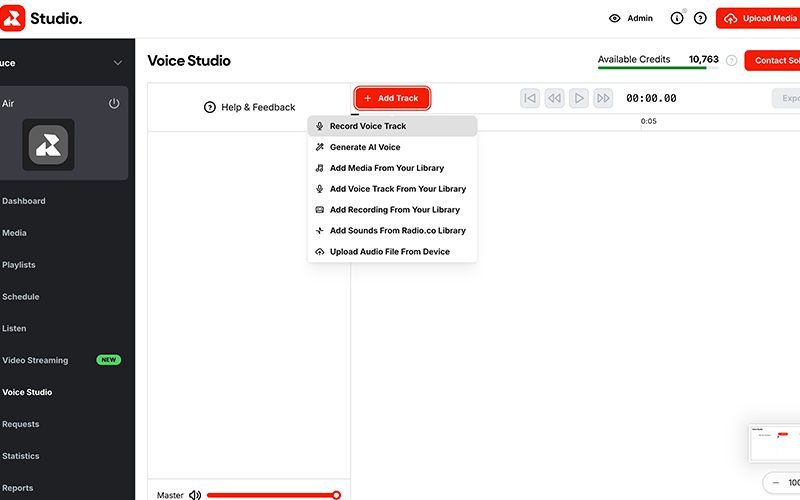
Browse through and select some sound effects for your Intro & Outro. Edit your Sound FX using the Voice Studio controls, like trimming your audio files and adding fades.
Once happy, Add Track again and either Record Voice Track or Generate AI Voice for your Intro. Create a generic voice that introduces the news and states your station name.
When happy, add to Voice Studio and make any needed adjustments to your Sound FX and Voice track like trimming off dead air.
Upload a suitable music bed or select one from the Radio.co library, and adjust the volumes and audio files positions as necessary.
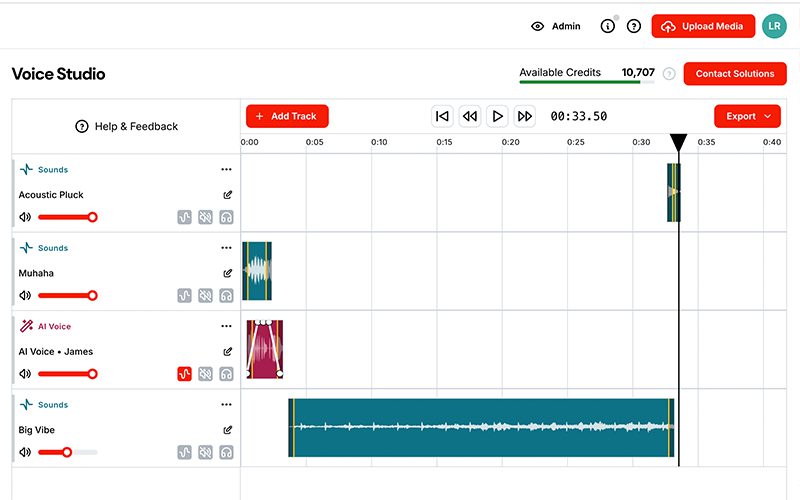
When finished, Export your file to Voice Studio and download to your device.
Turn Your News Script Into Speech and Add To Your News Bulletin Template
Now you can add in your actual news!
Select Add Track again, and either choose to record your own voice, or generate an AI voice if you don't want to read the script yourself.
If you choose to use an AI Voice, copy and paste your script from ShowProducer to Voice Studio.
Just bear in mind Voice Studio will generate all text, so make a copy of your script and take time to delete the production details like which announcer is speaking or when a jingle should come in. Keep your original script safe, but use the redacted script for voice generation.
Choose an AI voice you want for your news bulletin from the top drop down and hit generate. When you're happy, click add to Voice Studio.
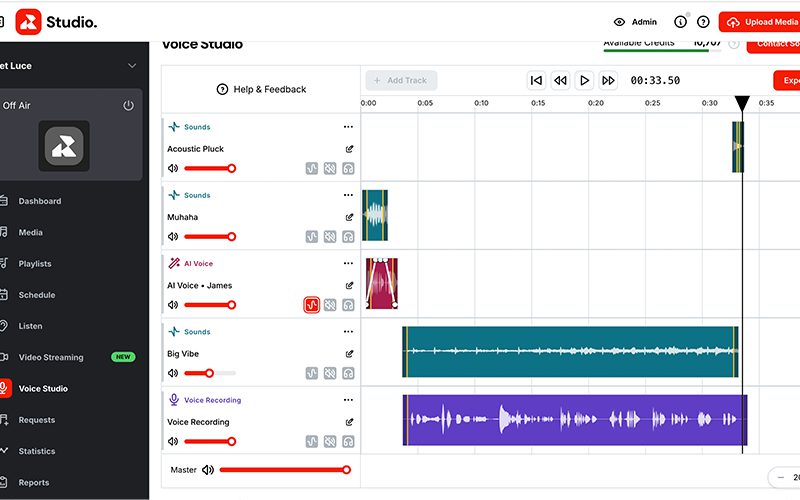
Now either your own recorded voice track or your generated voice track will be in the Voice Studio editor. Position this into the middle of your news bulletin, so it plays over your background audio.
Check the position of your other audio files, to ensure there is not dead air.
When happy, export to your computer to be fired off on-air whilst live-broadcasting, or add to your Radio.co media to be scheduled in with your playlists.
Conclusion
Getting news for your radio station doesn't have to be as complicated as it used to be. There are now feasible options for stations to create news segments themselves without a fully-staffed news room, or to take a hands-off approach and outsource to a radio news provider.
If you'd like to try either method for broadcasting the news, you'll need a Premium or Pro Radio.co account. Upgrade here.
Not part of the Radio.co family? See how we can work for you and your listeners by booking a one-on-one call with our broadcasting experts.


